Honeypot Security / Canary Assets
Compass maps your AWS infrastructure to find the highest-impact honeypot locations, plants canary assets in one click, and fires an instant alert the moment someone touches something they shouldn't.
Live inside Compass
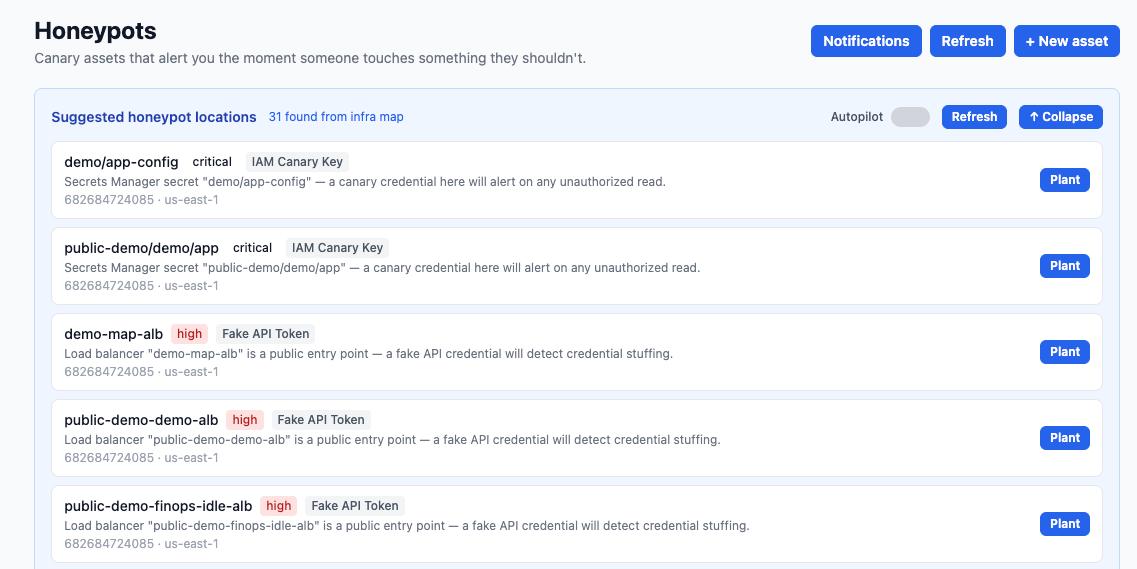
Compass surfaces 31 suggested honeypot locations from the infrastructure map, ranked critical → high → medium, with one-click Plant and Autopilot mode.
SIEM rules and anomaly detection fire after an attacker has already exfiltrated data, moved laterally, or encrypted files.
High-volume rules produce thousands of low-fidelity alerts. Security teams ignore noise and miss genuine intrusions.
Traditional honeypot servers require dedicated VMs, constant updates, and manual rotation. Cloud-scale deployments make this unmanageable.
Compass scans your entire AWS environment — IAM roles, secrets, load balancers, S3 buckets, API endpoints — and builds a complete asset map.
The AI identifies the highest-value targets an attacker would reach first — critical IAM paths, public entry points, secret stores — and ranks them by impact.
Deploy fake credentials, IAM canary keys, and fake API tokens into the highest-priority locations with a single click — or let Autopilot handle it.
Any access to a canary asset fires an instant notification. No legitimate user ever touches a honeypot — so every alert is a confirmed intrusion signal.
Canary credentials rotate on schedule, retired honeypots are cleaned up, and new placements are suggested as your infrastructure evolves — all via reviewable Terraform PRs.
As you deploy new resources, Compass re-evaluates honeypot placement and keeps your canary coverage in sync with your real infrastructure — automatically.
Compass plants honeypots that match your real infrastructure — making them indistinguishable to an attacker while remaining invisible to legitimate users.
Fake IAM credentials planted in Secrets Manager paths that attackers commonly target. Any API call using these keys fires an immediate alert with the caller's IP and identity.
Decoy tokens planted near public load balancers and API gateways to detect credential stuffing and reconnaissance by external attackers.
Fake SSH keys embedded in likely lateral movement paths. Detects post-compromise movement between EC2 instances before an attacker reaches critical systems.
Canary objects in S3 and EFS shares that trigger alerts the moment ransomware begins encrypting or deleting files — typically minutes before significant damage.
Fake internal hostnames that appear in configuration files. Any DNS resolution fires an alert, exposing attacker reconnaissance of your internal network topology.
Fake entries in AWS Secrets Manager and Parameter Store, seeded among real secrets, that alert when an attacker tries to enumerate or read credentials.
Every canary asset is provisioned, rotated, and decommissioned through your normal infrastructure code workflow. No ad-hoc console changes, no secret sprawl — full audit trail in Git.
+ resource "aws_secretsmanager_secret" "canary_api_key" {
+ name = "demo/app-config/api-key-canary"
+ description = "Canary credential — access triggers security alert"
+ tags = { beamreach_canary = "true" }
+ }
| Traditional Honeypot Server | Beamreach Canary Assets | |
|---|---|---|
| Deployment | Dedicated VM, manual setup | Terraform PR, one click |
| Maintenance | Patching, uptime, cost | Fully managed, no servers |
| Placement intelligence | Manual, ad hoc | AI-ranked from infra map |
| Credential rotation | Manual or none | Automated via Terraform PRs |
| Alert fidelity | SSH/TCP traffic, noisy | Zero false positives |
| Ransomware detection | Limited to honeypot server | S3/EFS canary files |
| Audit trail | Syslog | Git history + PR reviews |
Connect your AWS account, review the suggested honeypot locations, and deploy your first canary with a single Terraform PR — no honeypot infrastructure to maintain.
See more of what we build. Explore our automation portfolio →
A honeypot is a decoy resource — a fake server, credential, file, or API token — placed in an environment to attract attackers. Because no legitimate user or process should ever access it, any interaction is a confirmed intrusion signal with no false positives.
A canary token (or canary asset) is a lightweight honeypot: typically a URL, credential, or file that, when accessed, phones home to an alerting service. Canary assets extend this concept to cloud resources — IAM keys, S3 objects, secrets — that are native to AWS infrastructure.
Traditional honeypot servers are full virtual machines running fake services. Cloud-based honeypots are native cloud resources (fake credentials, decoy secret paths, canary S3 objects) that require no servers to maintain. Compass deploys and manages them entirely through Terraform, so they scale with your infrastructure automatically.
Yes. Anti-ransomware honeypots work by placing canary files in directories and S3 buckets that ransomware will attempt to encrypt or delete first. Compass detects the access event and fires an alert typically minutes before the malware reaches critical data.
An SSH honeypot involves planting fake SSH credentials or keys that an attacker might find during lateral movement — in config files, environment variables, or parameter stores. Compass identifies the most realistic SSH honeypot locations based on your real infra map and manages the credentials via Terraform PRs.
Compass continuously re-evaluates your infrastructure map. When new high-value resources appear, it suggests new canary placements. When resources are removed, it retires associated honeypots. All lifecycle operations — creation, rotation, decommission — are executed as Terraform PRs in your existing infrastructure code repository.