IaC Coverage / Terraform Drift Detection
Compass scans your live AWS accounts, compares every resource against Terraform state, and opens an import PR to bring unmanaged infrastructure under code control — instantly.
55%
Typical IaC coverage before Compass
100%
Target coverage with continuous import PRs
4
Drifted resources caught in a typical scan
1-click
To create an import PR for any resource
IaC Coverage dashboard — live inside Compass
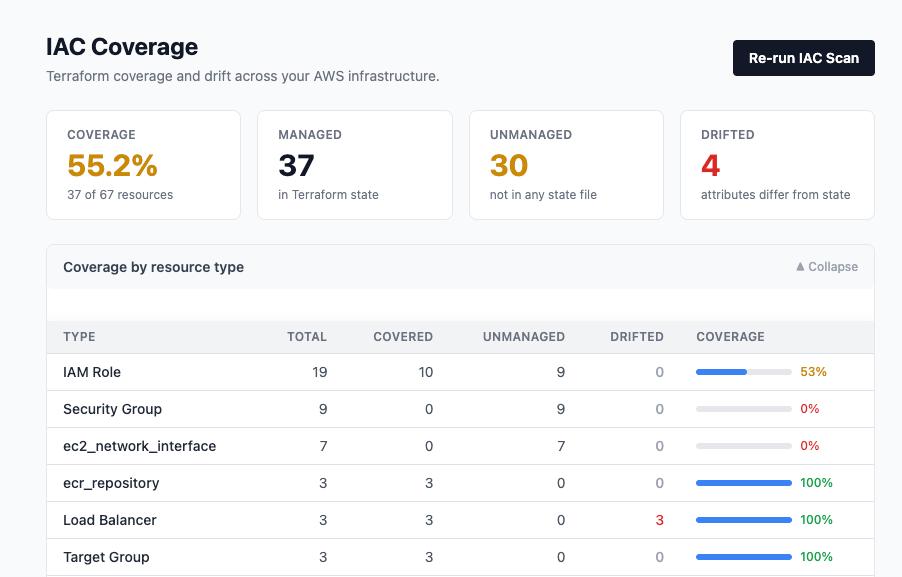
Coverage score per resource type — instantly see where your Terraform blindspots are across IAM, Security Groups, Load Balancers, and more.
Resources created through the console, CLI, or other tools accumulate outside Terraform state. They can't be managed, audited, or reproduced reliably.
When live attributes diverge from Terraform state, the next terraform apply may revert or break production. Drift often goes undetected for months.
Audits require proof that all infrastructure is managed as code. Unmanaged resources represent compliance risk that manual discovery can't keep up with.
Compass scans your AWS accounts across all regions and resource types — IAM roles, security groups, load balancers, ECR repos, DynamoDB tables, and more.
Every discovered resource is matched against your Terraform state files. Resources are classified as Managed, Unmanaged, or Drifted.
See your overall IaC coverage percentage and drill down by resource type. Instantly identify categories with 0% coverage — your highest-risk blindspots.
For drifted resources, Compass shows exactly which attributes diverge between live state and Terraform state — so you know whether to update code or reapply Terraform.
Select unmanaged resources, choose your repo and Terraform module path, and Compass opens a PR with the correct terraform import blocks and resource definitions.
Re-run the IaC scan on demand or on a schedule. As your coverage improves through merged PRs, the score updates to reflect your real state.
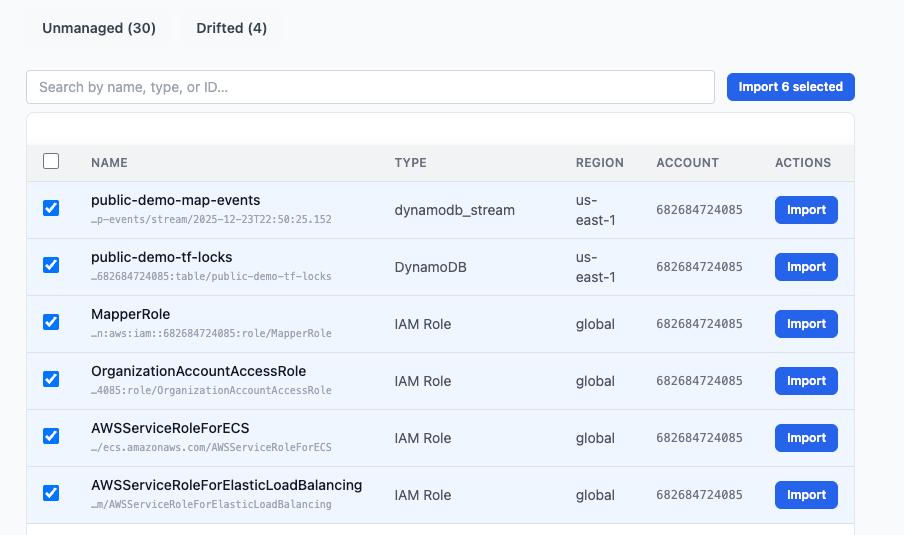
Select the resources you want to bring under Terraform control, pick the target repo and module, and Compass creates a ready-to-review PR — no manual import block writing required.
Step 1 — Select unmanaged resources
Step 2 — Create Import PR
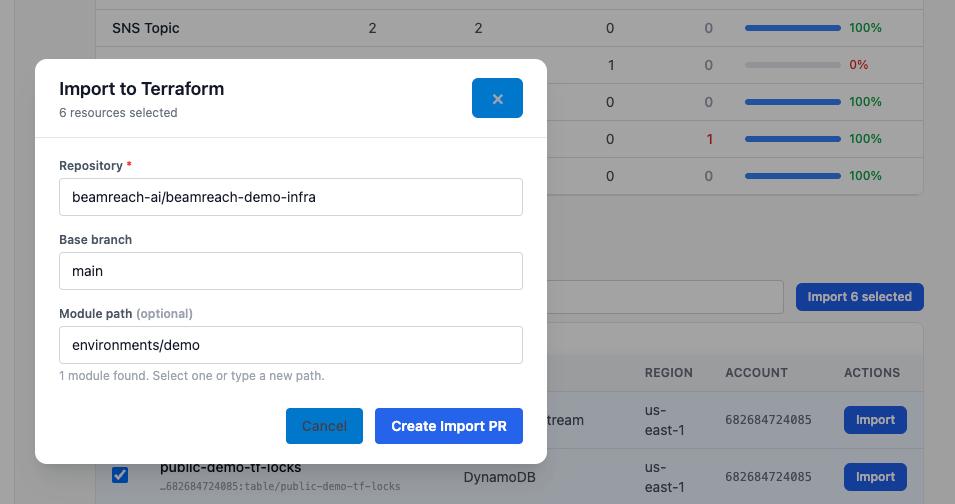
Compass detects your existing Terraform modules and suggests the correct module path — so imports land in the right place, not at the root.
Compass compares live AWS resources against Terraform state across the most critical resource categories — with more added continuously.
| terraform plan | Terraform Cloud | Beamreach Compass | |
|---|---|---|---|
| Discovers unmanaged resources | ✗ — only knows managed state | ✗ — limited to known state | ✓ Full AWS discovery |
| IaC coverage score | ✗ | ✗ | ✓ % by resource type |
| Attribute-level drift diff | Partial | ✓ | ✓ |
| Auto-generate import PRs | ✗ | ✗ | ✓ Module-aware |
| Multi-account / multi-region | Manual | ✓ | ✓ |
| Human-approved PR workflow | ✗ | Partial | ✓ Full PR review |
Connect your AWS account and GitHub repos. Compass runs the scan, shows you exactly what's unmanaged or drifted, and creates import PRs on demand.
See what else we build. Explore our automation portfolio →
IaC coverage is the percentage of your live cloud resources that are represented in infrastructure-as-code (Terraform, CloudFormation, etc.). A 55% IaC coverage score means 45% of your cloud resources exist outside any state file — unauditable, unversioned, and at risk of configuration drift.
Terraform drift occurs when live cloud resource attributes diverge from what's defined in Terraform state. Common causes include manual console changes, other automation tools making modifications, AWS service updates that change default configurations, or incomplete Terraform module definitions.
Compass performs a full scan of your live AWS environment, then cross-references each resource against your Terraform state files. Resources with attribute mismatches are flagged as drifted, with an exact diff showing which attributes changed and what their current vs. desired values are.
The built-in terraform plan command detects drift for managed resources only. Terraform Cloud adds continuous drift detection for known state. Beamreach Compass goes further by discovering unmanaged resources (outside Terraform state entirely), providing coverage scoring, and auto-generating import PRs — making it the most complete IaC coverage tool for AWS teams.
The standard approach is to write terraform import commands manually — time-consuming and error-prone. Compass automates this by generating the correct import blocks and resource definitions, placing them in the right Terraform module, and opening a PR for your team to review and merge.
Yes. Compass complements Terraform Cloud by adding the dimension Terraform Cloud lacks: unmanaged resource discovery. Terraform Cloud detects drift in resources it already manages; Compass finds the resources that aren't managed at all and brings them into Terraform through import PRs.